

You are using an out of date browser. It may not display this or other websites correctly.
You should upgrade or use an alternative browser.
You should upgrade or use an alternative browser.
Playing around with AI
- Thread starter paratom
- Start date

smgee
Western Thunderer
There seems to be a degree of confusion between simple algorithms and 'proper' AI.
Your first example of drones returning to home and landing is just simple automation.
Complex medical research is often at the cutting end of true AI where systems are designed to change their parameters as they learn more about their task, with monitoring from actual experts to 'mark their homework', then letting them run and seeing how the systems evolve.
A lot of the "AI" we're being allowed to use at the moment really is pretty dumb with little self checking, at best there's a simple good/bad option for feedback, so little opportunity to learn from feedback.
This is a good example from Hitme3D image to 3D generation.
The program has generated a figure that whilst looking good from the front, is plainly and obviously wrong from the back. If it had any self checking routine it should have spotted the lack of credible hands. However it won't know that error as it's simple good/bad feedback won't tell it that error to learn from. There are also other more subtle errors it shouldn't have made that could be corrected by 'expert' feedback.
View attachment 254221
Thanks Paul, I had no idea this was possible. I decided to have a play...
I found a mediocre photo of a diesel driver, removed the background and added a suggestion of leg (the original was hidden by chair/console/shadow).

The exportable, subscription-free option on meshy.ai uses an older, lower-quality model, but presents 4 guesses to choose from:

The best compromise seemed to be this handsome chap. He'll be buried in the cab of a Diesel, so the lack of detail probably won't be an issue.

There are some flaws - holes in his collar, hat shape wrong, and it turned out the sleeves and jacket tails aren't solid, so caused some print issues - but I'm amazed that the AI mostly guessed correctly. I decided to have a quick go at printing it on a Bambu A1 mini, and ended up with a thing:

I could see from the slicer that the bottom of the jacket, the sleeves and the peak of the cap were going to be problematic. Reducing the layer height, swapping to a 0.2mm nozzle, and experimenting with orientation would no doubt improve matters, but I was being lazy/impatient. I need to try him for size in a cab too.
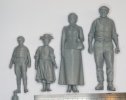
Running the same photo through the latest (subscription-required) model gave some interesting results!

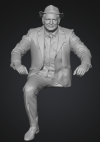
Maybe some tweaks to the photo would help there?!
I found I needed to remove the background and add the suggestion of a leg after my first attempt, using a different site, produced, err, Davros?!


paulc
Western Thunderer
It looks like the guys forefinger on his left hand is broken , I'm not sure it would be that bent otherwise .Thanks Paul, I had no idea this was possible. I decided to have a play...
I found a mediocre photo of a diesel driver, removed the background and added a suggestion of leg (the original was hidden by chair/console/shadow).
View attachment 254428
The exportable, subscription-free option on meshy.ai uses an older, lower-quality model, but presents 4 guesses to choose from:
View attachment 254431
The best compromise seemed to be this handsome chap. He'll be buried in the cab of a Diesel, so the lack of detail probably won't be an issue.
View attachment 254432
There are some flaws - holes in his collar, hat shape wrong, and it turned out the sleeves and jacket tails aren't solid, so caused some print issues - but I'm amazed that the AI mostly guessed correctly. I decided to have a quick go at printing it on a Bambu A1 mini, and ended up with a thing:
View attachment 254440
I could see from the slicer that the bottom of the jacket, the sleeves and the peak of the cap were going to be problematic. Reducing the layer height, swapping to a 0.2mm nozzle, and experimenting with orientation would no doubt improve matters, but I was being lazy/impatient. I need to try him for size in a cab too.
Running the same photo through the latest (subscription-required) model gave some interesting results!
View attachment 254441
View attachment 254442
Maybe some tweaks to the photo would help there?!
I found I needed to remove the background and add the suggestion of a leg after my first attempt, using a different site, produced, err, Davros?!
View attachment 254443
For anyone wanting to have a play with this tech the basic Meshy option isn't great, the later version 6 is much more detailed. A subscription needs to be tackled correctly and then you can greatly increase the number of models you can make in a trial month at half price, then drop the sub.Thanks Paul, I had no idea this was possible. I decided to have a play...
The exportable, subscription-free option on meshy.ai uses an older, lower-quality model, but presents 4 guesses to choose from:
A much better free option at the moment is to use the image to 3D system on Makersworld and use the Hitme3D 1.5 option https://makerworld.com/en/makerlab/imageTo3d Models take longer to generate than Meshy, but often hit better results with less spurious detail than the Meshy models.
There's a long, but very useful thread on the Garden railway forum where this is dissected and the best strategies are found and shared.
It's also worth exploring the possibilities of editing the STLs in Blender to refine and repose the figures to a pose that works for your particular requirement.
Yes, a 0.2mm nozzle and 0.5mm layers gives almost resin like quality...after a wait.I could see from the slicer that the bottom of the jacket, the sleeves and the peak of the cap were going to be problematic. Reducing the layer height, swapping to a 0.2mm nozzle, and experimenting with orientation would no doubt improve matters, but I was being lazy/impatient. I need to try him for size in a cab too.
Running the same photo through the latest (subscription-required) model gave some interesting results!
Ian Rathbone
Western Thunderer
I took this photo (by Pete Silvester) of a group of locos on 82G and told chatGPT to add light steam.

And this was the result -
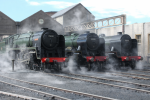
The Scot now has Patriot style deflectors, a weird top feed and a new number. On another photo I told it to add light smoke, which it added to the dome but not the chimney.
On the initial photo in this thread - no white lines on platform edges!
Ian R
And this was the result -
The Scot now has Patriot style deflectors, a weird top feed and a new number. On another photo I told it to add light smoke, which it added to the dome but not the chimney.
On the initial photo in this thread - no white lines on platform edges!
Ian R

PaulRhB
Active Member
The Scot now has Patriot style deflectors, a weird top feed and a new number. On another photo I told it to add light smoke, which it added to the dome but not the chimney.
On the initial photo in this thread - no white lines on platform edges!
Ian R
It’s also changed the Brit’s tender making the side higher, curved the smoke deflectors and added another link to the valve gear.
The handrail on 46143 now becomes the nearest smoke deflector too.
It’s changed 45513’s smokebox door.
Then it’s also changed the wall to the right, making it higher and the round window behind!
In total it’s made a bit of a mess of the photo


Ian@StEnochs
Western Thunderer
It takes a bit of persistence and careful thought in what ask the bot to do but you can get quite a realistic scene with luck. The free version only permits a few attempts per 24 hours so this picture took me since last Wednesday.
My starting point,
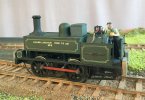
I asked for industrial buildings in the background and got this.

I then asked to remove the chimneys, well It did just that!

My next instruction was to go back and restore the chimney on the loco and add light steam round foreground.

The final result is quite believable, except for Driver Tam’s big hand that is.
My starting point,
I asked for industrial buildings in the background and got this.
I then asked to remove the chimneys, well It did just that!
My next instruction was to go back and restore the chimney on the loco and add light steam round foreground.
The final result is quite believable, except for Driver Tam’s big hand that is.

Pencarrow
Western Thunderer
I took this photo (by Pete Silvester) of a group of locos on 82G and told chatGPT to add light steam.
View attachment 254978
And this was the result -
View attachment 254979
The Scot now has Patriot style deflectors, a weird top feed and a new number. On another photo I told it to add light smoke, which it added to the dome but not the chimney.
On the initial photo in this thread - no white lines on platform edges!
Ian R
Hi Ian, that very much matches my initial experiences using AI to alter a photograph. A few weeks back I asked the Gemini AI to add snow to a scene on my layout which included the newly arrived Bulleid. Good grief did it mangle the loco by adding elements of other loco types.

(Could be a competition to identify the source locos fir all the non-Bulleid parts - of which there seem to be many)
I have found to get best results you need to be very prescriptive in the instructions as to what to change and how, but equally as important what not to change.
In the case of your photo I set the task as follows: "Add light drifting smoke from the three locomotive chimneys and a small amount of steam around the locomotive cylinders. Do not alter the shape or form of the locomotives or the scene."
The result was this:

And adding an autumnal sky...

(Happy to delete the photos if anyone is offended by me altering the original)
Equally, better defining the Bulleid task resulted in this (I opened the smokebox door in real life for this photo):

Last edited:
Pencarrow
Western Thunderer
Given careful instructions, I am quite impressed as to what Gemini AI can do to amend photos.
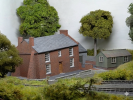
This is the raw original photo, with the building currently lacking windows and tiles.

I asked it to add small roof tiles and sash windows and importantly told it not to alter the shape or form of the buildings and scene. I think the end result is quite convincing.
With the weather forecasts being full of snow doom, I asked it to add snow and ice. It got a bit carried away with icicles, and the green trees didn't look right.

I then told it to lose the icicles and add heavier snow, including the trees. (All the time reminding it not to much around with other stuff).
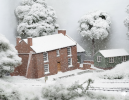
Quite an interesting learning experience and my conclusion is that you have to treat the AI as a naughty child - tell it what you do what but also what behaviour is unacceptable.
This is the raw original photo, with the building currently lacking windows and tiles.
I asked it to add small roof tiles and sash windows and importantly told it not to alter the shape or form of the buildings and scene. I think the end result is quite convincing.
With the weather forecasts being full of snow doom, I asked it to add snow and ice. It got a bit carried away with icicles, and the green trees didn't look right.
I then told it to lose the icicles and add heavier snow, including the trees. (All the time reminding it not to much around with other stuff).
Quite an interesting learning experience and my conclusion is that you have to treat the AI as a naughty child - tell it what you do what but also what behaviour is unacceptable.


Pencarrow
Western Thunderer
Bit of a risk asking AI to do something to the Crooked House - I'm surprised it didn't add an Oxford diecast to the scene
View attachment 254998
Now look what just happened.

It's obviously struggled a bit with filling in the background and a tree looks decidedly dodgy...

Yorkshire Dave
Western Thunderer
Close, but it still has some way to go though as AI is only as good as the developers/programmers interpretation of the real world and what they subsequently program into their AI suites.
It appears AI struggled to interpret the lighting conditions in the initial photo. Looking at the original photo as if facing north I see an artificial light source from the south west (left front) was used which I would assume was to fill the shadow. This is a different colour temperature from the light source (from a window I presume) from the right, behind the loco. In this situation the best way to fill the shadow would have been the photographers trick to use a piece of white card or paper to reflect the natural light from the window. This would lighten the shadows but not remove them altogether.
Looking at the wall and chimney it also appears AI struggles with shadows. Given the main light source from the north east (right rear) I would have expected the south west facing walls, including the one with the chimney, to be slightly darker like the chimney.
Yes, AI has also struggled with the overhead lighting from the south east (right front) and applied an early morning or late evening sky which means whole scene should be in shadow. And like some AI photograph colourisation (colourization) it has struggled to fill areas initially hidden and in shadow on the original photo.

The final result is quite believable, except for Driver Tam’s big hand that is.
It appears AI struggled to interpret the lighting conditions in the initial photo. Looking at the original photo as if facing north I see an artificial light source from the south west (left front) was used which I would assume was to fill the shadow. This is a different colour temperature from the light source (from a window I presume) from the right, behind the loco. In this situation the best way to fill the shadow would have been the photographers trick to use a piece of white card or paper to reflect the natural light from the window. This would lighten the shadows but not remove them altogether.
Looking at the wall and chimney it also appears AI struggles with shadows. Given the main light source from the north east (right rear) I would have expected the south west facing walls, including the one with the chimney, to be slightly darker like the chimney.

It's obviously struggled a bit with filling in the background and a tree looks decidedly dodgy...
Yes, AI has also struggled with the overhead lighting from the south east (right front) and applied an early morning or late evening sky which means whole scene should be in shadow. And like some AI photograph colourisation (colourization) it has struggled to fill areas initially hidden and in shadow on the original photo.
Jordan or Plymouth Mad
Mid-Western Thunderer
There's always one, ain't there??Now look what just happened

You'll be using AI to produce photos of scrapped Pannier Tanks next....

 I typed that out loud didn't I?
Pencarrow
Western Thunderer
There's always one, ain't there??
You'll be using AI to produce photos of scrapped Pannier Tanks next....
Wait one....

spikey faz
Western Thunderer
Lovely looking locomotive. Is it a scratchbuild?It takes a bit of persistence and careful thought in what ask the bot to do but you can get quite a realistic scene with luck. The free version only permits a few attempts per 24 hours so this picture took me since last Wednesday.
My starting point,
View attachment 254987
I asked for industrial buildings in the background and got this.
View attachment 254984
I then asked to remove the chimneys, well It did just that!
View attachment 254985
My next instruction was to go back and restore the chimney on the loco and add light steam round foreground.
View attachment 254986
The final result is quite believable, except for Driver Tam’s big hand that is.
Mike
Ian@StEnochs
Western Thunderer
Thanks Mike, it is. The original was built 1856 by Hawthorns of Leith but my version is of her after being rebuilt at Dunaskin in 1903.Lovely looking locomotive. Is it a scratchbuild?
Mike
spikey faz
Western Thunderer
Apologies for thread derail, but I'd love to know a bit more about this. Did you take any pics when you were constructing it?Thanks Mike, it is. The original was built 1856 by Hawthorns of Leith but my version is of her after being rebuilt at Dunaskin in 1903.
Mike
Ian@StEnochs
Western Thunderer
Apologies for thread derail, but I'd love to know a bit more about this. Did you take any pics when you were constructing it?
Mike
I built her way back in the early 90’s before digital cameras so no pictures, sorry. She was a relative quick build as we needed some spare, appropriate, Industrials to work the pit branch off ‘Auchlin’ which was on the show circuit at the time.