
You are using an out of date browser. It may not display this or other websites correctly.
You should upgrade or use an alternative browser.
You should upgrade or use an alternative browser.
Brick panel generator for laser cutting
- Thread starter adrian
- Start date

Bexhill west
New Member
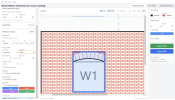
Here's an example screen capture of an SVG from the brick generator. I couldn't upload an SVG directly.
Things that the generator will do:
Brickwork in 5 different bond patterns with auto placement of queen/king closers where necessary - I'll be adding other bond patterns,
Openings with square or arched tops, currently there are 7 arch styles, including 3 centred ellipses for bridges etc. & mullions,
Openings auto-snap in width and height to match the brick coursing of the selected bond and course height.
String courses, in brick or stone,
Stone quoins (optional)
Gables (optional)
Tracery options.
.dxf and .svg export, with .pdf .jpg and .png to be added.
All dimensions are user controlled,
to be added: other arch types, spandrel blocks, Dutch gables, padstones, and layers to add depth.
This is still a WIP, but it's not bad as is.
Best,
James

Things that the generator will do:
Brickwork in 5 different bond patterns with auto placement of queen/king closers where necessary - I'll be adding other bond patterns,
Openings with square or arched tops, currently there are 7 arch styles, including 3 centred ellipses for bridges etc. & mullions,
Openings auto-snap in width and height to match the brick coursing of the selected bond and course height.
String courses, in brick or stone,
Stone quoins (optional)
Gables (optional)
Tracery options.
.dxf and .svg export, with .pdf .jpg and .png to be added.
All dimensions are user controlled,
to be added: other arch types, spandrel blocks, Dutch gables, padstones, and layers to add depth.
This is still a WIP, but it's not bad as is.
Best,
James

Greengiant
Western Thunderer
Here's an example screen capture of an SVG from the brick generator. I couldn't upload an SVG directly.
Things that the generator will do:
Brickwork in 5 different bond patterns with auto placement of queen/king closers where necessary - I'll be adding other bond patterns,
Openings with square or arched tops, currently there are 7 arch styles, including 3 centred ellipses for bridges etc. & mullions,
Openings auto-snap in width and height to match the brick coursing of the selected bond and course height.
String courses, in brick or stone,
Stone quoins (optional)
Gables (optional)
Tracery options.
.dxf and .svg export, with .pdf .jpg and .png to be added.
All dimensions are user controlled,
to be added: other arch types, spandrel blocks, Dutch gables, padstones, and layers to add depth.
This is still a WIP, but it's not bad as is.
Best,
James
View attachment 254484
Hi James,
I watched your video the other day when it popped up in my YouTube feed and shared it on the narrow gauge modelling forum.
This will be a very useful tool for initial planning of buildings that I make in 16mm (1/19 scale). I have a big industrial buildings project coming up, I can see this being handy to quickly work out sizes and wall layouts.
I also laser cut buildings in 7mm scale. Currently I can quickly generate walls of brick in Illustrator using the Align tool mainly. Then I overlay the window and door opening and delete the parts of courses and vertical joins not required, that takes the time. If I later change my mind on a window position I have some fiddly editing to do, this tool will greatly ease that part of the process.
Will this App be PC or Mac based, or both?
Does the SVG file produced have the courses and joins as separate paths, or does it produce the bricks as their own outline?
Martin
Lacking a reply from James yet;Will this App be PC or Mac based, or both?
Does the SVG file produced have the courses and joins as separate paths, or does it produce the bricks as their own outline?
In the video it looks like a Windows app from the menu items.
As there appears to be no option to control mortar line width, I think it's safe to assume it's a single line, especially given the author's preferred scale of working. I would imagine that drawing individual bricks would add to the complexity of the software and significantly slow down the program as there would be a lot more data to manipulate.
The later is a bit of a pity for those of us working in larger scales. I'd still be interested to try it out and see what can be achieved.
Bexhill west
New Member
Hi Paul and Martin,Lacking a reply from James yet;
In the video it looks like a Windows app from the menu items.
As there appears to be no option to control mortar line width, I think it's safe to assume it's a single line, especially given the author's preferred scale of working. I would imagine that drawing individual bricks would add to the complexity of the software and significantly slow down the program as there would be a lot more data to manipulate.
The later is a bit of a pity for those of us working in larger scales. I'd still be interested to try it out and see what can be achieved.
I've been struggling to keep up with the comments on YouTube, but to answer your questions...
As shown, the app uses a single line width, as that's my preferred approach in 4mm. I have a selection of lasers to play with and adjust my mortar joints by using machines with different spot sizes. I appreciate that not everyone has that luxury.
However, hidden from view in the video (as I thought it would create a distraction and require a lengthy explanation - which might confuse further), is a function to set the mortar width in (0.1mm increments) and/or off-set the mortar line as it appears on screen to create individual rectangular bricks. There is also the option to export all or some of these vectors.
So, in the larger scales it would be possible to export individual bricks and effectively cut rectangles, or 'fat' mortar joints which could be rastered. Or simply use a 120w CO2 laser with a large spot size on the lines as per the image above. I hope that description makes sense.
In short, I think it should cater for most eventualities.
As for the app itself, it's an electron app so should work across most platforms.
Cheers,
James


Phil O
Western Thunderer
Lacking a reply from James yet;
In the video it looks like a Windows app from the menu items.
As there appears to be no option to control mortar line width, I think it's safe to assume it's a single line, especially given the author's preferred scale of working. I would imagine that drawing individual bricks would add to the complexity of the software and significantly slow down the program as there would be a lot more data to manipulate.
The later is a bit of a pity for those of us working in larger scales. I'd still be interested to try it out and see what can be achieved.
Paul,
Sometimes it's easier to make a post on the Templot Forum, where this appeared on Saturday morning.

Thanks for the detailed reply James.
However I'm curious to see if it's output could be adapted for use with 3D printers without huge amounts of work. It will interesting to try ;-)
I think I understand that, but I'm not familiar enough with laser cutters and am unlikely to get one anytime soon.However, hidden from view in the video (as I thought it would create a distraction and require a lengthy explanation - which might confuse further), is a function to set the mortar width in (0.1mm increments) and/or off-set the mortar line as it appears on screen to create individual rectangular bricks. There is also the option to export all or some of these vectors.
So, in the larger scales it would be possible to export individual bricks and effectively cut rectangles, or 'fat' mortar joints which could be rastered. Or simply use a 120w CO2 laser with a large spot size on the lines as per the image above. I hope that description makes sense.
In short, I think it should cater for most eventualities.
However I'm curious to see if it's output could be adapted for use with 3D printers without huge amounts of work. It will interesting to try ;-)